
Fast XML & XSD Validation for Developers
Overview
The NSSO XML Validator is a specialized browser extension designed to streamline XML and XSD validation workflows for developers. Built with a focus on precision and speed, it enables users to validate XML documents against XSD schemas directly within the Chrome browser environment. This tool addresses common challenges in data integrity and schema compliance, particularly in web development and API integration projects where structured data accuracy is critical.
Targeted primarily at software engineers, backend developers, and technical QA professionals, the extension provides immediate feedback on XML structure and schema adherence. It supports two primary interaction methods: launching the main interface via the extension icon or analyzing selected text on any webpage using the context menu. This dual-access approach enhances workflow integration, allowing developers to validate data snippets without leaving their current browser session.
Developed by the NSSO Team, this tool reflects a focused effort to simplify complex validation tasks. Real-world use cases include verifying configuration files, debugging API responses, and ensuring compliance with industry-standard data formats. The extension operates entirely within the browser, eliminating the need for external software installation while maintaining secure, client-side processing of sensitive data.
Key Features & Capabilities
- Inline XML Validation – Analyze XML content directly on any webpage by selecting text and using the context menu. This feature enables quick verification of data payloads without manual copying or file transfers.
- XSD Schema Integration – Validate XML documents against predefined XSD schemas, ensuring structural and data type compliance with specified standards.
- Context Menu Accessibility – Launch the validation tool instantly from any Chrome page, improving workflow efficiency for developers working across multiple web resources.
- Extension Icon Activation – Open the full-featured main screen by clicking the extension icon, providing access to advanced settings and detailed validation reports.
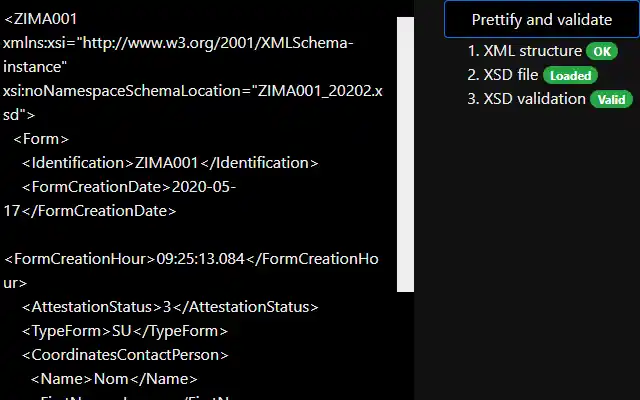
- Real-Time Feedback – Receive immediate validation results, helping identify syntax errors, missing elements, or data type mismatches during development cycles.
These capabilities support efficient debugging and quality assurance in environments where XML is used for data exchange. For example, developers can validate API response bodies, inspect configuration files, or verify data submitted through web forms. The tool’s seamless integration into the browser workflow reduces context switching and enhances productivity during iterative development.
User Interface, Workflow & Performance
The user interface is designed for clarity and minimal disruption. The main screen, accessible via the extension icon, presents a clean layout with input fields for XML and XSD, along with a results panel displaying validation outcomes. Navigation is intuitive, relying on standard browser extension patterns, which reduces the learning curve for new users.
Workflow efficiency is enhanced by the dual access method: the context menu allows rapid validation of selected text, while the main screen supports more complex tasks like schema uploads and detailed error analysis. The extension operates entirely within the browser’s sandboxed environment, ensuring that input data remains local and secure.
Performance observations are based on general software behavior patterns. The developer did not specify resource usage details. However, given the extension’s size of 1.5 MB and browser-based execution, it is expected to have minimal impact on system performance. Stability is maintained through Chrome’s extension framework, which manages memory and execution safely.
Compatibility & System Requirements
The NSSO XML Validator is compatible with Windows, Mac, and Linux operating systems, ensuring broad accessibility across development environments. It functions as a Chrome browser extension, requiring the latest stable version of Google Chrome for optimal performance.
Installation size is 1.5 MB, a compact footprint that minimizes storage impact. The developer did not specify additional hardware requirements or system specifications beyond the supported platforms. Exact system requirements were not listed, but the extension’s lightweight design suggests compatibility with standard development machines.
Platform compatibility information is limited to the listed operating systems and Chrome browser. No information was provided regarding support for alternative browsers or offline functionality.
Pros and Cons
Pros
- Fast, real-time XML and XSD validation directly in the browser
- Two intuitive access methods: context menu and extension icon
- Lightweight design with minimal system impact (1.5 MB)
- Secure, client-side processing with no data uploads
- Designed specifically for developers working with structured data
Cons
- Limited to Chrome browser; no support for other browsers
- No offline mode available (requires active internet connection)
- Exact performance metrics and resource usage not disclosed
- Functionality restricted to XML and XSD validation only
FAQ Section
Is the NSSO XML Validator compatible with browsers other than Chrome?
Currently, the extension is designed exclusively for Google Chrome. No support was provided for alternative browsers such as Firefox, Edge, or Safari.
Does the tool upload my XML data to external servers?
No. All validation processes occur locally within the browser. The extension does not transmit user data to external servers, ensuring data privacy and security.
How often are updates released for the extension?
The developer did not provide information on update frequency. Users should check the Chrome Web Store for the latest version and release notes.
What type of license does the tool use?
The NSSO XML Validator is distributed as free software. No licensing fees are required for use, and no restrictions were specified regarding commercial or personal use.
Can I use this tool without an internet connection?
While the extension itself runs locally, it may require an internet connection to access certain online resources or updates. The developer did not confirm whether full functionality is available offline.
Final Thoughts + CTA
The NSSO XML Validator delivers a focused, efficient solution for developers working with XML and XSD formats. Its seamless integration into the Chrome browser, combined with real-time validation and secure processing, makes it a valuable addition to any developer’s toolkit. The dual-access design enhances usability across different workflows, from quick checks to detailed analysis.
While limited to Chrome and lacking offline capabilities, its lightweight nature and immediate feedback loop significantly improve validation speed and accuracy. The tool is especially beneficial for backend developers, API testers, and technical teams managing structured data exchanges.
For developers seeking a reliable, no-cost tool to validate XML against XSD schemas, this extension offers a practical and secure solution. Download NSSO XML Validator now.







